Pages

Showing posts with label JavaScript. Show all posts

Monday, March 7, 2016

JavaScript Functions

If you read my previous post about objects (Nested Objects in JavaScript) in JavaScript Objects are the kings. You can find only two things in JavaScript, objects and primitives. Do you know that Functions are also objects in JavaScript, functions inherited from objects, In JavaScript we can find 2 types of JavaScript function definitions.

·         Function declaration
·         Function expression

They're actually really similar. How you call them is exactly the same, but the difference lies in how the browser loads them into the execution context. Function declarations loads before any code is executed. While function expressions loads only when the interpreter reaches that line of code. So if you try to call a function expression before it's loaded, you'll get an error but if you call a function declaration, it'll always work. Because no code can be called until all declarations are loaded, before drilling down into the depth of this problem lets have simple understanding of each.

Function Declaration

Function expression

Now it’s the right time to discuss about hoisting .Hoisting is JavaScript's default behavior of moving declarations to the top of the current scope. Hoisting applies to

  • Variable declarations 
  • Function declarations. (Because of this, JavaScript functions can be called before they are declared).
Functions defined using an expression are not hoisted. Read more on hoisting (http://www.w3schools.com/js/js_hoisting.asp )

The Function () Constructor

It’s really discouraging to write your function using default Function constructor, because of its messy appearance.

Self-Invoking Functions
This self-invoking expressions are invoked automatically. When functional expression followed by () it’s automatically invoked and this mechanism is not working with function declaration.


Also functions can use within expressions.


As I state earlier functions are objects. Then as usual functions should have methods and properties. Then you may think of what are the methods and properties of function object.


Let’s see few of the important objects things that you can do with a function in JavaScript

Function is an instance of object type


When we run above script it gives “true”


Function has its own properties


When we discuss about JavaScript functions we need to have some idea about closure and recursion.
Recursion
If you dealing with any programming language probably you may know the meaning of recursion .when a function calling itself we called it as recursion.
Always when I hear the word recursion factorial numbers are the first thing comes into my mind. Let’s look at a simple example which use recursion to display the value of a factorial number.

Closure
A closure is an inner function that has access to the outer (enclosing) function’s variables—scope chain. The closure has three scope chains: it has access to its own scope (variables defined between its curly brackets), it has access to the outer function’s variables, and it has access to the global variables. As this topic should discuss in an informative way hope to have another post on JavaScript Closure.


Hope above information help you in understanding functions in JavaScript. Until meet next time HAPPY CODING J

Thursday, March 3, 2016

Nested Objects in JavaScript

First of all let’s see how to create an empty object in JavaScript. Open up your browser console (Open new tab and right click on it and go to inspect element -> console) and type
var empty = {};   and then empty.toString(); then it will give "[object Object]"
Output shows that “empty” is an object.
As we are going to discuss about objects it’s really need to know the importance of JavaScript objects. In JavaScript objects are treated as the kings because JavaScript is designed on a simple object-based paradigm.
“Objects in JavaScript, just as in many other programming languages, can be compared to objects in real life. The concept of objects in JavaScript can be understood with real life, tangible objects.” If you want to read more on objects visit https://developer.mozilla.org/en-US/docs/Web/JavaScript/Guide/Working_with_Objects

For an example let’s take mobile phone as a real world object
Figure - 01


Figure - 02


Let’s create a simple HTML file which includes script tag to implement above sample in JavaScript
Figure - 03

In the above file I created a simple h3 tag call display (display is the id of h3 tag) to print the message that I pass into displayInfo( ) function.

Our main objective of this post is to learn about Nested Objects. Here we simply refresh our knowledge on JavaScript objects, properties and methods so let’s start in creating phone object.

Figure - 04

Figure - 05

Here I create an empty object call phone and print it inside my HTML document. Now we are going to include all properties into phone object.
Figure - 06


Figure - 07

Now we need to add all 4 methods into phone object.

Figure - 08


Below will be the final output of the above script
Figure - 09

Now our memorizing part is finished J .Didn’t you find something strange which we are not address up to this level
Figure - 10

Phone Battery: Simple real-world object which is located inside the phone.
Then how we should represent it inside our program. It’s useless to discuss about a phone battery without a phone. Now the Nested Objects come into action.
Figure - 11


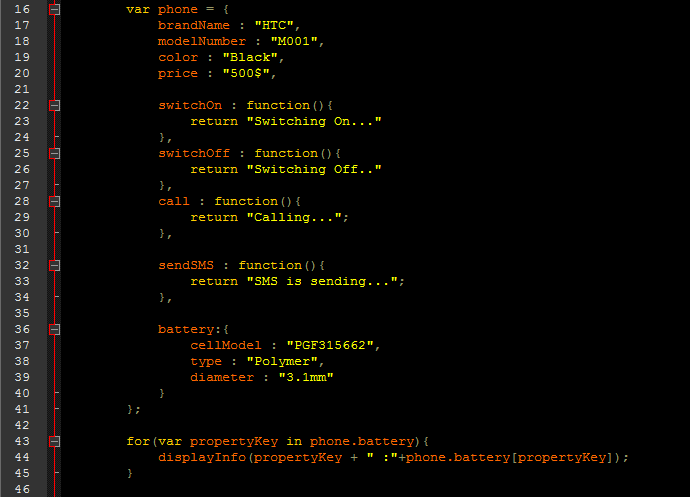
After adding Nested Object into our existing phone object our updated code is
Figure - 12


Figure - 13

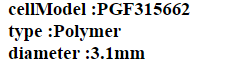
I have done small modification to our for loop to display the content of battery object which is located inside the phone.
Figure - 14


Figure - 15

Now I am going to share some different ways which we can use to represent Nested Objects.
This is the person object which contains two Nested objects call address and mood
Figure - 16

This is another way of representing vehicle object Nested Loop object
Figure - 17

Finally I include a different representation of phone object with nested battery object
Figure - 18

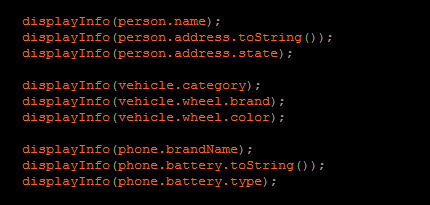
To check whether your objects are working fine write below code to print them.


Figure - 19


This is the end of Nested Objects .If you have any suggestions for improvements, please let me know .Happy Coding J

Sunday, July 27, 2014

What is the DOM?

What is meant by the DOM (Document Object Model?).Is it a programming language? Part of a JavaScript? There are thousands of questions in our mind when we hear the word DOM for the first time.
In normal perspective;


So let’s see what the objects in HTML document are. As in the real document we can decompose our original html document into several objects like title tag, header (EX:<h1> )tags, img tag and also we can consider the whole document as one object,


Because sometimes an object may contain other objects too. If we take <ul>(unordered list) for example, it contains several <li> (list) items.
Now definitely you may be wondering what is meant by “Model”, that we have mentioned in “document object model”. Do you know there is a JavaScript term for every object in html page? If any part (or object) in the html document is represented using tree structure, we can explain it as a “model”. Oh do you feel uncomfortable with that term? Please don’t, it’s absolutely a simple thing as mentioned below.


In JavaScript, there are agreed upon terms to access each object mentioned above. On another day we will discuss how to access those elements using JavaScript terms.  

Thursday, July 17, 2014

Numbers

When we assign a number to a variable using JavaScript there will be numerous questions in our mind mostly when we are familiar with other programming languages like java, c.


Whether this number is
          A long integer
          Short integer
          Or floating point?

But do you know “Internally all JavaScript numbers are considered as 64 bit floating point numbers”. But it will not be a big issue as JavaScript is a client side programming language and not a server based one.


Wednesday, July 16, 2014

What is the technical difference between PREFIX & POSTFIX versions of INCREMENT & DECREMENT OPERATORS?


Let’s assume var A= 3; and var B=6; below you can see 4 different ways of incrementing and decrementing a variable value. At the end of each operation the end result is same. It doesn’t matter whether you are using A=A+1; or A+=1; or A++; or ++A; it will give A=4 as the end result of each.


But let us discuss what the difference is between A++; (POSTFIX) & ++A; (PREFIX) operators. To identify the difference clearly you can use the code given below.


This means when you use prefix it will increment or decrement the value through the execution and if you use postfix it will increment or decrement the value at the end of the execution process of the particular instruction (after the semicolon).

Tuesday, July 15, 2014

Identifying the difference between the “Assignment Operator” & “Equality Operator” in JavaScript


Let’s see how to get rid of malfunctioning which occur in our application because of the misuse of “=” operators.

We can use “=” in three ways. They are;
        
     1)    “= “ used as Assignment operator(Assign value for a variable)
var A=10;

     2)   “==” used as Equality operator(check equality )
if(A==10) {
                                                          // Run this
}

      3)   “===” used as Equality operator (check equality )
If(A===10){
                                                        //Run this
}

Now you may wonder what the difference is between operators used in number (2) and (3).

To have a clear idea about this let’s see an example,
var A=123;
var B=”123”;
If(A==B){
          alert(“Variable A is equal to the variable  B”);
}
else{
          alert(“Variable A is not equal to the variable  B”);

}


var A=123;
var B=”123”;
If(A===B){
          alert(“Variable A is equal to the variable  B”);
}
else{
          alert(“Variable A is not equal to the variable  B”);

}


So we can say “==” is used for equality (it just simply checks the similarity and does not concern about variable types and so on) and “===”use to check strict equality (used for strict equality check where it also concerns about whether the two value’s and their variable types are same )